FUJIFILM Logo
  • PRODUCTS
    PRODUCTS
    • Browse
      • Cameras
      • Lenses
      • Accessories
      • Software
      • Help Me Choose
    • By System
      • GFX Series
        • Cameras
        • Lenses
      • X Series
        • Cameras
        • Lenses
    • Group Items ( Link disabled )
      • Compare
        • Cameras
      • About Our Technology
        • Filmmaking
        • Film Simulation
        • X-Trans CMOS
    • B2B Customers
      • Digital Imaging Solution
      • IR Camera
      • Camera Control SDK
    GFX Series View all
    Cameras Mirrorless Digital Camera
    • GFX100 II
      GFX100 II
    • GFX100S II
      GFX100S II
    Fixed Lens Camera
    • GFX100RF
      GFX100RF
    Filmmaking Camera
    • GFX ETERNA 55
      GFX ETERNA 55
    GFX Series View all
    Lenses Prime
    • GF23mmF4 R LM WR
      GF23mmF4 R LM WR
    • GF30mmF3.5 R WR
      GF30mmF3.5 R WR
    • GF45mmF2.8 R WR
      GF45mmF2.8 R WR
    • GF50mmF3.5 R LM WR
      GF50mmF3.5 R LM WR
    • GF55mmF1.7 R WR
      GF55mmF1.7 R WR
    • GF63mmF2.8 R WR
      GF63mmF2.8 R WR
    • GF80mmF1.7 R WR
      GF80mmF1.7 R WR
    • GF110mmF2 R LM WR
      GF110mmF2 R LM WR
    • GF120mmF4 R LM OIS WR Macro
      GF120mmF4 R LM OIS WR Macro
    • GF250mmF4 R LM OIS WR
      GF250mmF4 R LM OIS WR
    • GF500mmF5.6 R LM OIS WR
      GF500mmF5.6 R LM OIS WR
    Zoom
    • GF20-35mmF4 R WR
      GF20-35mmF4 R WR
    • GF32-64mmF4 R LM WR
      GF32-64mmF4 R LM WR
    • GF32-90mmT3.5 PZ OIS WR
      GF32-90mmT3.5 PZ OIS WR
    • GF35-70mmF4.5-5.6 WR
      GF35-70mmF4.5-5.6 WR
    • GF45-100mmF4 R LM OIS WR
      GF45-100mmF4 R LM OIS WR
    • GF100-200mmF5.6 R LM OIS WR
      GF100-200mmF5.6 R LM OIS WR
    Tilt-Shift
    • GF30mmF5.6 T/S
      GF30mmF5.6 T/S
    • GF110mmF5.6 T/S Macro
      GF110mmF5.6 T/S Macro
    Teleconverter
    • GF1.4X TC WR
      GF1.4X TC WR
    X Series View all
    Cameras Mirrorless Digital Camera
    • X-H2S
      X-H2S
    • X-H2
      X-H2
    • X-Pro3
      X-Pro3
    • X-T5
      X-T5
    • X-S20
      X-S20
    • X-T50
      X-T50
    • X-T30 III
      X-T30 III
    • X-E5
      X-E5
    • X-M5
      X-M5
    Fixed Lens Camera
    • X100VI
      X100VI
    • X half
      X half
    X Series View all
    Lenses Prime
    • XF8mmF3.5 R WR
      XF8mmF3.5 R WR
    • XF14mmF2.8 R
      XF14mmF2.8 R
    • XF16mmF1.4 R WR
      XF16mmF1.4 R WR
    • XF16mmF2.8 R WR
      XF16mmF2.8 R WR
    • XF18mmF1.4 R LM WR
      XF18mmF1.4 R LM WR
    • XF18mmF2 R
      XF18mmF2 R
    • XF23mmF1.4 R LM WR
      XF23mmF1.4 R LM WR
    • XF23mmF2 R WR
      XF23mmF2 R WR
    • XF23mmF2.8 R WR
      XF23mmF2.8 R WR
    • XF27mmF2.8 R WR
      XF27mmF2.8 R WR
    • XF30mmF2.8 R LM WR Macro
      XF30mmF2.8 R LM WR Macro
    • XF33mmF1.4 R LM WR
      XF33mmF1.4 R LM WR
    • XF35mmF1.4 R
      XF35mmF1.4 R
    • XF35mmF2 R WR
      XF35mmF2 R WR
    • XF50mmF1.0 R WR
      XF50mmF1.0 R WR
    • XF50mmF2 R WR
      XF50mmF2 R WR
    • XF56mmF1.2 R WR
      XF56mmF1.2 R WR
    • XF60mmF2.4 R Macro
      XF60mmF2.4 R Macro
    • XF80mmF2.8 R LM OIS WR Macro
      XF80mmF2.8 R LM OIS WR Macro
    • XF90mmF2 R LM WR
      XF90mmF2 R LM WR
    • XF200mmF2 R LM OIS WR
      XF200mmF2 R LM OIS WR
    • XF500mmF5.6 R LM OIS WR
      XF500mmF5.6 R LM OIS WR
    • XC35mmF2
      XC35mmF2
    Zoom
    • XF8-16mmF2.8 R LM WR
      XF8-16mmF2.8 R LM WR
    • XF10-24mmF4 R OIS WR
      XF10-24mmF4 R OIS WR
    • XF16-50mmF2.8-4.8 R LM WR
      XF16-50mmF2.8-4.8 R LM WR
    • XF16-55mmF2.8 R LM WR II
      XF16-55mmF2.8 R LM WR II
    • XF16-80mmF4 R OIS WR
      XF16-80mmF4 R OIS WR
    • XF18-120mmF4 LM PZ WR
      XF18-120mmF4 LM PZ WR
    • XF18-135mmF3.5-5.6 R LM OIS WR
      XF18-135mmF3.5-5.6 R LM OIS WR
    • XF50-140mmF2.8 R LM OIS WR
      XF50-140mmF2.8 R LM OIS WR
    • XF55-200mmF3.5-4.8 R LM OIS
      XF55-200mmF3.5-4.8 R LM OIS
    • XF70-300mmF4-5.6 R LM OIS WR
      XF70-300mmF4-5.6 R LM OIS WR
    • XF100-400mmF4.5-5.6 R LM OIS WR
      XF100-400mmF4.5-5.6 R LM OIS WR
    • XF150-600mmF5.6-8 R LM OIS WR
      XF150-600mmF5.6-8 R LM OIS WR
    • XC13-33mmF3.5-6.3 OIS
      XC13-33mmF3.5-6.3 OIS
    • XC15-45mmF3.5-5.6 OIS PZ
      XC15-45mmF3.5-5.6 OIS PZ
    • XC50-230mmF4.5-6.7 OIS II
      XC50-230mmF4.5-6.7 OIS II
    Teleconverter
    • XF1.4X TC WR
      XF1.4X TC WR
    • XF2X TC WR
      XF2X TC WR
    Cine
    • MKX18-55mmT2.9
      MKX18-55mmT2.9
    • MKX50-135mmT2.9
      MKX50-135mmT2.9
  • Support
    SUPPORT
    • Downloads
      • Firmware
      • Software
      • LUT
      • Technical Data
    • Manuals
      • Cameras
      • Lenses
      • Accessories
      • Software
    • Compatibility
      • Cameras
      • Lenses
      • Accessories
      • Software
    • More Links
      • FAQ
      • FUJIFILM Service Centre
      • FUJIFILM X | GFX Members
      • FUJIFILM Professional Services (FPS)
  • News
  • Events
  • Promotions
  • Shop
  • X-Photographers
    • Galleries
    • Photographer
  • X Stories
    • X Stories
    • Learning Centre
©FUJIFILM Corporation.

Learning Centre

  • twitter
  • facebook
© Seth K Hughes

> 4 minute read

When to Use Exposure Compensation

Looking for an easy way to make photos brighter and darker without getting bogged down in technical stuff? You need exposure compensation.

Exposure compensation is a great way to quickly change the brightness of a photo when you’re using one of your camera’s automatic or semiautomatic shooting modes. By dialling in a positive or negative value, you are telling the camera to make your photo brighter or darker, which it will do by adjusting one of the three things that affect exposure – shutter speed, aperture, or ISO.

Adjusting image brightness like this is a great way to get creative by shooting a picture that’s brighter or darker than normal, and is also a way to correct your camera if it’s been confused by a difficult situation. You don’t have to abandon the convenience of an auto shooting mode to do this, a quick adjustment of exposure compensation is all that’s needed.

© Bill Fortney

Some of our cameras have dedicated dials for exposure compensation, while others use the rear dial for this adjustment. Either way, the principal is the same: to brighten an image by dialing in some positive exposure compensation. For a darker result, use negative values. You’ll see a scale in the camera’s viewfinder and on its touchscreen that shows you the amount of compensation currently in use.
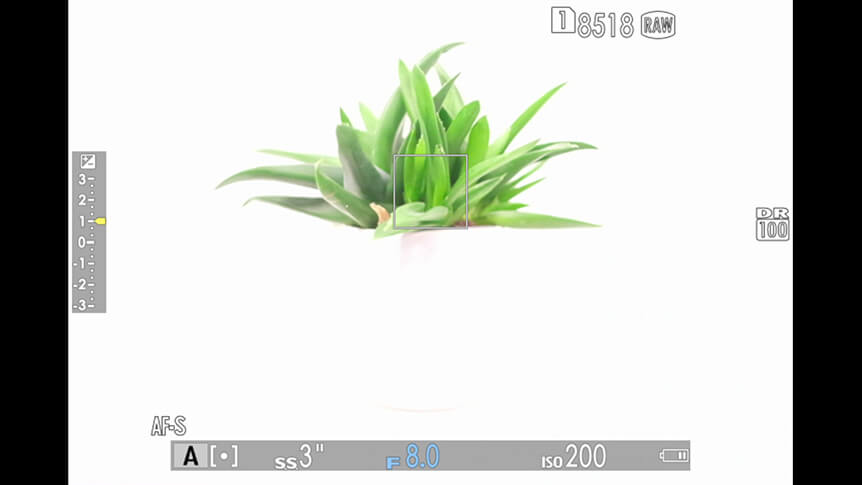
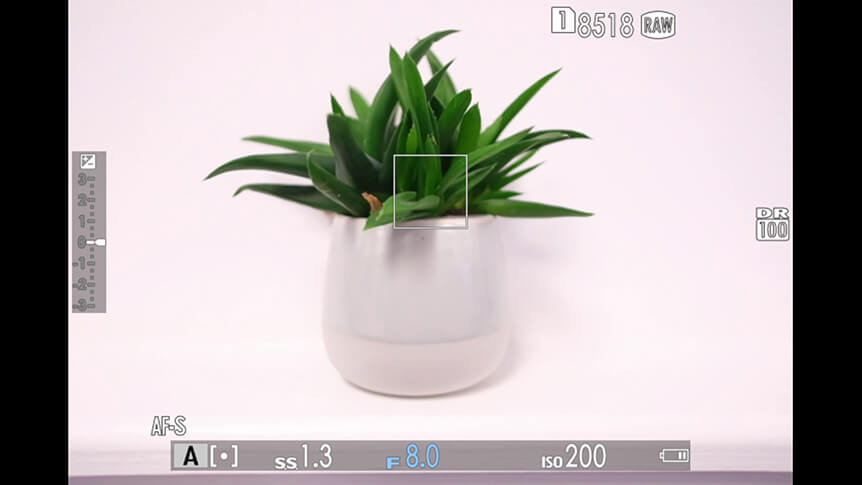
Try this with your camera now. Set it to an automatic mode like SR+ AUTO, P, or A, and take a note of the exposure values it picks for a scene. This might be 1/500 sec at F8. Now apply +1 stop of exposure compensation and point the camera at the same scene. The shutter speed should read one stop slower (1/250 sec at F8 in our example) as the camera is letting in double the amount of light by lengthening the shutter speed by one stop.

Applying negative exposure compensation has the opposite effect. Setting this to -1 would shorten the shutter speed by one stop, letting in half the amount of light.

When to Use Exposure Compensation?

The short answer to this question is: whenever things don’t look quite as you expected. But there are some common situations where you’ll find yourself reaching for the exposure compensation dial fairly regularly.

Backlit Portraits

When you photograph someone against a background that’s brighter than they are, your camera can get confused and try to pick an aperture and shutter speed for the background, not your subject. The result is a perfectly exposed background with a dark (or even silhouetted) person standing in front of it.

One way around this problem is to apply some positive exposure compensation, so the whole scene is brighter. How much depends on how much backlighting is present – try a few variations to see the effect.

© Xing Liu

© Xing Liu

Sunsets

One time when you want a perfectly exposed sky, and don’t need to be too worried about the foreground being dark, is when shooting a sunset. If you feel that the sky could be a touch darker to bring out the colours better, dial in a little negative exposure compensation. Just -0.5 to -1 stop should do it.

© Seth K Hughes

When Photographing Bright or White Scenes

The apertures and shutter speeds chosen by your camera are meant to reproduce scenes containing a range of average tones, like mid-greys. Therefore, when you shoot a scene containing bright whites – like a snowy landscape – your camera can pick settings that underexpose and make the white snow look distinctly gray.
Remedy this by applying some positive exposure compensation, which forces the camera to let in more light and brightens up the white tones.

© Daniel H. Bailey

When Photographing Dark or Black Scenes

Likewise, when photographing very dark scenes, your camera may pick a shutter speed and aperture that overexposes these, rendering blacks as gray. You can fix this by dialing in some negative exposure compensation, which will darken the scene.

© Afton Almaraz

A word of warning: when using exposure compensation, be sure to return the control to ±0 when you’ve finished, otherwise all subsequent shots will be affected.

Your Next Steps

  • CHALLENGE Go out for a walk with your camera and shoot some pictures in your neighbourhood. Every time you take a picture, play with the exposure compensation dial to see the effect that this has on your imagery. Post your results to social media with the hashtag #learnwithfujifilm. You can also submit your work here for a chance to be featured on our social media channels

Also Try...

Using Negative Space

Which GFX Camera Body Is Right for You?

Specialised for different photographers’ needs, how do GFX bodies compare?

Three Ways to Improve Exposure on Moving Subjects

Discover some FUJIFILM X Series camera tricks to help you create great sports and action images

  • Products
    • Cameras
    • Lenses
    • Accessories
    • Software
    • Help Me Choose
  • Support
    • Download
    • Manual
    • Compatibility
    • FAQ
    • FUJIFILM X | GFX Members
    • FUJIFILM Professional Services (FPS)
    • Product Security Information
  • More
    • X-Photographers
    • X Stories
    • Learning Centre
    • Events
    • News
    • Promotions
    • Shop
Follow Us
  • UK
  • Global
FUJIFILM ©FUJIFILM Corporation.
  • Contact
  • Privacy Policy
  • Terms of Use
  • Cookie Settings
Select Your Country Or Region
  • America
    • pt-br

      Brazil

    • en-ca

      Canada

      • English
      • French
    • en-us

      USA

  • Asia Pacific
    • zh-cn

      China

    • en-in

      India

    • id-id

      Indonesia

    • ja-jp

      Japan

    • ko-kr

      Korea

    • en-my

      Malaysia

    • en-ph

      Philippines

    • en-sg

      Singapore

    • th-th

      Thailand

    • vi-vn

      Vietnam

  • Europe
    • de-at

      Austria

    • fr-be

      Belgium

      • Dutch
      • French
    • hr-hr

      Croatia

    • cs-cz

      Czechia

    • da-dk

      Denmark

    • et-ee

      Estonia

    • fi-fi

      Finland

    • fr-fr

      France

    • de-de

      Germany

    • el-gr

      Greece

    • hu-hu

      Hungary

    • is-is

      Iceland

    • en-ie

      Ireland

    • it-it

      Italy

    • lv-lv

      Latvia

    • lt-lt

      Lithuania

    • nl-nl

      Netherlands

    • no-no

      Norway

    • pl-pl

      Poland

    • pt-pt

      Portugal

    • ro-ro

      Romania

    • ru-ru

      Russia

    • sk-sk

      Slovakia

    • sl-si

      Slovenia

    • es-es

      Spain

    • sv-se

      Sweden

    • fr-ch

      Switzerland

      • French
      • German
    • tr-tr

      Turkey

    • en-gb

      UK

    • uk-ua

      Ukraine

  • Oceania
    • en-au

      Australia

    • en-nz

      New Zealand

  • Other
    • global

      Global

Stay in touch

Sign up to receive emails from FUJIFILM to be inspired by the world of X and GFX series and stay up-to-date with new product releases.

[ * ] Required fields








