FUJIFILM Logo
  • PRODUCTS
    PRODUCTS
    • Browse
      • Cameras
      • Lenses
      • Accessories
      • Software
      • Help Me Choose
    • By System
      • GFX Series
        • Cameras
        • Lenses
      • X Series
        • Cameras
        • Lenses
    • Group Items ( Link disabled )
      • Compare
        • Cameras
      • About Our Technology
        • Filmmaking
        • Film Simulation
        • X-Trans CMOS
    • B2B Customers
      • Digital Imaging Solution
      • IR Camera
      • Camera Control SDK
    GFX Series View all
    Cameras Mirrorless Digital Camera
    • GFX100 II
      GFX100 II
    • GFX100S II
      GFX100S II
    Fixed Lens Camera
    • GFX100RF
      GFX100RF
    Filmmaking Camera
    • GFX ETERNA 55
      GFX ETERNA 55
    GFX Series View all
    Lenses Prime
    • GF23mmF4 R LM WR
      GF23mmF4 R LM WR
    • GF30mmF3.5 R WR
      GF30mmF3.5 R WR
    • GF45mmF2.8 R WR
      GF45mmF2.8 R WR
    • GF50mmF3.5 R LM WR
      GF50mmF3.5 R LM WR
    • GF55mmF1.7 R WR
      GF55mmF1.7 R WR
    • GF63mmF2.8 R WR
      GF63mmF2.8 R WR
    • GF80mmF1.7 R WR
      GF80mmF1.7 R WR
    • GF110mmF2 R LM WR
      GF110mmF2 R LM WR
    • GF120mmF4 R LM OIS WR Macro
      GF120mmF4 R LM OIS WR Macro
    • GF250mmF4 R LM OIS WR
      GF250mmF4 R LM OIS WR
    • GF500mmF5.6 R LM OIS WR
      GF500mmF5.6 R LM OIS WR
    Zoom
    • GF20-35mmF4 R WR
      GF20-35mmF4 R WR
    • GF32-64mmF4 R LM WR
      GF32-64mmF4 R LM WR
    • GF32-90mmT3.5 PZ OIS WR
      GF32-90mmT3.5 PZ OIS WR
    • GF35-70mmF4.5-5.6 WR
      GF35-70mmF4.5-5.6 WR
    • GF45-100mmF4 R LM OIS WR
      GF45-100mmF4 R LM OIS WR
    • GF100-200mmF5.6 R LM OIS WR
      GF100-200mmF5.6 R LM OIS WR
    Tilt-Shift
    • GF30mmF5.6 T/S
      GF30mmF5.6 T/S
    • GF110mmF5.6 T/S Macro
      GF110mmF5.6 T/S Macro
    Teleconverter
    • GF1.4X TC WR
      GF1.4X TC WR
    X Series View all
    Cameras Mirrorless Digital Camera
    • X-H2S
      X-H2S
    • X-H2
      X-H2
    • X-Pro3
      X-Pro3
    • X-T5
      X-T5
    • X-S20
      X-S20
    • X-T50
      X-T50
    • X-T30 III
      X-T30 III
    • X-E5
      X-E5
    • X-M5
      X-M5
    Fixed Lens Camera
    • X100VI
      X100VI
    • X half
      X half
    X Series View all
    Lenses Prime
    • XF8mmF3.5 R WR
      XF8mmF3.5 R WR
    • XF14mmF2.8 R
      XF14mmF2.8 R
    • XF16mmF1.4 R WR
      XF16mmF1.4 R WR
    • XF16mmF2.8 R WR
      XF16mmF2.8 R WR
    • XF18mmF1.4 R LM WR
      XF18mmF1.4 R LM WR
    • XF18mmF2 R
      XF18mmF2 R
    • XF23mmF1.4 R LM WR
      XF23mmF1.4 R LM WR
    • XF23mmF2 R WR
      XF23mmF2 R WR
    • XF23mmF2.8 R WR
      XF23mmF2.8 R WR
    • XF27mmF2.8 R WR
      XF27mmF2.8 R WR
    • XF30mmF2.8 R LM WR Macro
      XF30mmF2.8 R LM WR Macro
    • XF33mmF1.4 R LM WR
      XF33mmF1.4 R LM WR
    • XF35mmF1.4 R
      XF35mmF1.4 R
    • XF35mmF2 R WR
      XF35mmF2 R WR
    • XF50mmF1.0 R WR
      XF50mmF1.0 R WR
    • XF50mmF2 R WR
      XF50mmF2 R WR
    • XF56mmF1.2 R WR
      XF56mmF1.2 R WR
    • XF60mmF2.4 R Macro
      XF60mmF2.4 R Macro
    • XF80mmF2.8 R LM OIS WR Macro
      XF80mmF2.8 R LM OIS WR Macro
    • XF90mmF2 R LM WR
      XF90mmF2 R LM WR
    • XF200mmF2 R LM OIS WR
      XF200mmF2 R LM OIS WR
    • XF500mmF5.6 R LM OIS WR
      XF500mmF5.6 R LM OIS WR
    • XC35mmF2
      XC35mmF2
    Zoom
    • XF8-16mmF2.8 R LM WR
      XF8-16mmF2.8 R LM WR
    • XF10-24mmF4 R OIS WR
      XF10-24mmF4 R OIS WR
    • XF16-50mmF2.8-4.8 R LM WR
      XF16-50mmF2.8-4.8 R LM WR
    • XF16-55mmF2.8 R LM WR II
      XF16-55mmF2.8 R LM WR II
    • XF16-80mmF4 R OIS WR
      XF16-80mmF4 R OIS WR
    • XF18-120mmF4 LM PZ WR
      XF18-120mmF4 LM PZ WR
    • XF18-135mmF3.5-5.6 R LM OIS WR
      XF18-135mmF3.5-5.6 R LM OIS WR
    • XF50-140mmF2.8 R LM OIS WR
      XF50-140mmF2.8 R LM OIS WR
    • XF55-200mmF3.5-4.8 R LM OIS
      XF55-200mmF3.5-4.8 R LM OIS
    • XF70-300mmF4-5.6 R LM OIS WR
      XF70-300mmF4-5.6 R LM OIS WR
    • XF100-400mmF4.5-5.6 R LM OIS WR
      XF100-400mmF4.5-5.6 R LM OIS WR
    • XF150-600mmF5.6-8 R LM OIS WR
      XF150-600mmF5.6-8 R LM OIS WR
    • XC13-33mmF3.5-6.3 OIS
      XC13-33mmF3.5-6.3 OIS
    • XC15-45mmF3.5-5.6 OIS PZ
      XC15-45mmF3.5-5.6 OIS PZ
    • XC50-230mmF4.5-6.7 OIS II
      XC50-230mmF4.5-6.7 OIS II
    Teleconverter
    • XF1.4X TC WR
      XF1.4X TC WR
    • XF2X TC WR
      XF2X TC WR
    Cine
    • MKX18-55mmT2.9
      MKX18-55mmT2.9
    • MKX50-135mmT2.9
      MKX50-135mmT2.9
  • Support
    SUPPORT
    • Downloads
      • Firmware
      • Software
      • LUT
      • Technical Data
    • Manuals
      • Cameras
      • Lenses
      • Accessories
      • Software
    • Compatibility
      • Cameras
      • Lenses
      • Accessories
      • Software
    • More Links
      • FAQ
      • FUJIFILM Service Centre
      • FUJIFILM X | GFX Members
      • FUJIFILM Professional Services (FPS)
  • News
  • Events
  • Promotions
  • Shop
  • X-Photographers
    • Galleries
    • Photographer
  • X Stories
    • X Stories
    • Learning Centre
©FUJIFILM Corporation.

Learning Centre

  • twitter
  • facebook
Photo © Bryan Minear

> 6 minute read

Make Amazing Movies in Slow Motion

Take your filmmaking to a new level with silky-smooth slomo effects – it’s easy with your X Series camera

Along with all the benefits of regular moviemaking, your X Series camera has a suite of slow-motion modes. These can produce brilliant results when used on action, wildlife, and even everyday subjects, so it’s time to get using them as part of your filmmaking.

Slow motion adds glorious appeal to almost any subject, so long as it’s moving in a dramatic way. Imagine framing a slow-motion swing at a cricket game or a player teeing off at the golf course. Or train your lens on a bird of prey coming in for the kill. You can even get great results when focusing on simple scenery and natural subjects like rolling waves of the sea or swaying branches on a woodland walk, and this kind of footage is brilliant when added as B roll to a longer narrative. Read on to discover all you need to know about using slow motion on X Series cameras.

Photo © Justin Black

How Slow Motion Works

Let’s get something clear. You can make a slow-motion effect from any footage you record simply by slowing it down during the editing process, but if you don’t create the footage in the right way initially, it will always look choppy and inferior compared to a true slow-motion sequence.

Why is that? Well, say you record some video at 24 frames-per-second (24p) – if you slow the footage down to half speed in editing, the action will move more slowly – taking twice as long to play – but it will also seem to jump from one frame to the next, as though it’s stuttering.

Proper slow-motion footage is still slowed down in editing or playback, but crucially it is made up of more frames to start with, so the movement of the action looks perfectly smooth.

Going back to that 24p movie as an example: to get a half-speed effect, you need to record at twice the normal frame rate before playing it back at the regular speed, so that would be 48p. And if you want a 5x slow-motion effect, you need to record at 120p and still play back at 24p. Easy!

Video © Seth K Hughes

How to Pick the Slow Motion Mode

To access the slow-motion modes on your X Series camera, find the MOVIE SETTING menu and select FULL HD HIGH SPEED REC. You may have to be in MOVIE mode to do this, which depending on the X Series camera you have, can be achieved by either a switch or dial on the body, or by picking MOVIE from the Drive mode.

The slow-motion options can vary from model to model, but in this menu, you’ll be able to choose from several different speeds of recording and playback, including 2x, 3x, 4x, 5x, and 10x speeds.
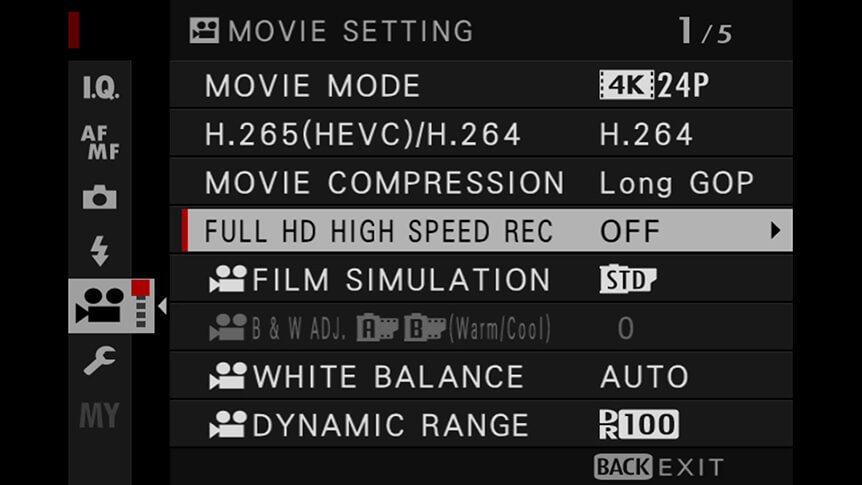
To find the right option for you, choose the setting that’s the same as the frame rate you’re using for the rest of your movie. Or if the slow motion is to be used alone, whichever one suits the style of movie you’re making. This is called the playback frame rate.

Some X Series cameras will have just one option in terms of the recording speed, but on others, you can then also select an even slower recording speed. For instance, record 24p playback at 240p and you’ll have 10x slow motion.

Matching the Slow Motion to the Subject

If the slow-motion effect is central to the movie you’re making, you can choose the setting based on the speed of the subject and the length of time you need to show the action that’s happening.

For example, a tennis player serving might look great at 240p, as it’s a fast action. Whereas a golfer making a putt could take an eternity at that speed, so a 120p or 100p setting might be more suitable.

Remember to Change the Shutter Speed

Just like regular footage, it’s important to examine the shutter speed you’re using when recording slow motion. If you’re recording at 24p, you’d normally set a shutter speed of half the frame rate – 1/48 sec or 1/50 sec – to give the footage a smooth look.

Switch to recording in slow motion and the recording frame rate will need to be higher. At 120p, you’re now looking at a shutter speed of 1/240 sec. There is some scope for faster and slower speeds when using slow motion, and it will often depend on the look you want, but go too low and your motion will look blurred, too fast, and it may begin to look jerky.

The Higher the Frame Rate, the More Light You’ll Need

When using faster shutter speeds, you’ll notice that increasing the shutter speed will make the footage darker. So you’ll need to compensate, either using a higher ISO setting or a wider aperture. Alternatively, look to make your slow-motion footage when there’s lots of light around, like the middle of a sunny day or, if that’s not possible, increase the strength of the light using LEDs.

In some cases, recording slow-motion footage can reveal the flicker in indoor lighting, too. To fix this, you can either change the type of light or alter the frame rate.

Video © Seth K Hughes

Other Stuff to Remember When Recording Slow Motion

What else? Well, for one thing, when making a slow-motion movie, you won’t record any sound. For this reason, it’s a good idea to either use ambient noise recorded at the same time you made the movie or, better yet, find some music to add over the top of the footage.

Also, think about camera movement. Slow motion can look dull if the camera is static while recording, so have a go at moving it to follow the subject. You can raise or lower it, or pan left or right. Optical Image Stabilization (OIS) or In-Body Image Stabilization (IBIS) will help here, but the slowing down of the recorded frames in playback will also smooth out the movements, so you can get creative and manoeuvre the camera faster than before.

Video © Bryan Minear

Also Try...

Using Negative Space

Which GFX Camera Body Is Right for You?

Specialised for different photographers’ needs, how do GFX bodies compare?

Three Ways to Improve Exposure on Moving Subjects

Discover some FUJIFILM X Series camera tricks to help you create great sports and action images

  • Products
    • Cameras
    • Lenses
    • Accessories
    • Software
    • Help Me Choose
  • Support
    • Download
    • Manual
    • Compatibility
    • FAQ
    • FUJIFILM X | GFX Members
    • FUJIFILM Professional Services (FPS)
    • Product Security Information
  • More
    • X-Photographers
    • X Stories
    • Learning Centre
    • Events
    • News
    • Promotions
    • Shop
Follow Us
  • UK
  • Global
FUJIFILM ©FUJIFILM Corporation.
  • Contact
  • Privacy Policy
  • Terms of Use
  • Cookie Settings
Select Your Country Or Region
  • America
    • pt-br

      Brazil

    • en-ca

      Canada

      • English
      • French
    • en-us

      USA

  • Asia Pacific
    • zh-cn

      China

    • en-in

      India

    • id-id

      Indonesia

    • ja-jp

      Japan

    • ko-kr

      Korea

    • en-my

      Malaysia

    • en-ph

      Philippines

    • en-sg

      Singapore

    • th-th

      Thailand

    • vi-vn

      Vietnam

  • Europe
    • de-at

      Austria

    • fr-be

      Belgium

      • Dutch
      • French
    • hr-hr

      Croatia

    • cs-cz

      Czechia

    • da-dk

      Denmark

    • et-ee

      Estonia

    • fi-fi

      Finland

    • fr-fr

      France

    • de-de

      Germany

    • el-gr

      Greece

    • hu-hu

      Hungary

    • is-is

      Iceland

    • en-ie

      Ireland

    • it-it

      Italy

    • lv-lv

      Latvia

    • lt-lt

      Lithuania

    • nl-nl

      Netherlands

    • no-no

      Norway

    • pl-pl

      Poland

    • pt-pt

      Portugal

    • ro-ro

      Romania

    • ru-ru

      Russia

    • sk-sk

      Slovakia

    • sl-si

      Slovenia

    • es-es

      Spain

    • sv-se

      Sweden

    • fr-ch

      Switzerland

      • French
      • German
    • tr-tr

      Turkey

    • en-gb

      UK

    • uk-ua

      Ukraine

  • Oceania
    • en-au

      Australia

    • en-nz

      New Zealand

  • Other
    • global

      Global

Stay in touch

Sign up to receive emails from FUJIFILM to be inspired by the world of X and GFX series and stay up-to-date with new product releases.

[ * ] Required fields

Stay in touch

Sign up to receive emails from FUJIFILM to be inspired by the world of X and GFX series and stay up-to-date with new product releases.

[ * ] Required fields








